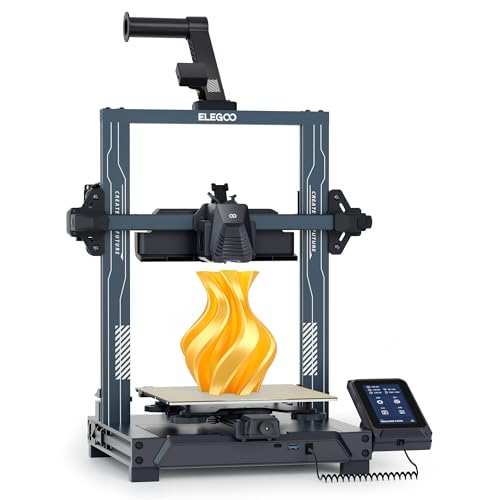
ELEGOO Neptune 4 Pro 3D Printer, 500mm/s High Speed Printer with Auto Leveling, Segmented Heatbed and All-Metal Guide Rails, 225x225x265mm Printing Size
4.3 out of 5 (341 Amazon ratings) on Amazon
Price shown was last seen 3d ago. Amazon prices change frequently — check before buying.
Specification
| Brand | ELEGOO |
| Condition | New |
| ASIN | B0CDPLW93T |
| Type | High-speed, Auto-levelling |
Our review: ELEGOO Neptune 4 Pro
Desk research, not hands-on testing: specifications, independent reviews, documented issues and buyer data. Both scores are calculated from the inputs listed below. How we score
Verdict: A capable, low-cost Klipper printer with a 300°C hotend and 121-point levelling. It needs some assembly and more hands-on care than the app-driven printers, and its stock fans are loud.
5 / 10 Technical difficulty: Medium
7.4 / 10 From buyer ratings, track record and known issues
- Klipper firmware with a web interface for network printing and deep configurability
- 121-point automatic bed levelling
- 300°C nozzle and 110°C bed for a wide range of materials
- Removable 4.3-inch touchscreen and a filament run-out sensor
- A low price for a full-size printer
- Arrives in parts: the gantry must be bolted on and cabled up
- Loud stock cooling fans, widely reported by owners
- Vibration compensation needs an accelerometer, which is not included
- Linear rails need periodic greasing
- Bed-slinger: it needs clear space front and back
Best for: Budget buyers who enjoy learning how their printer works and like the openness of Klipper firmware.
Look elsewhere if: You want a printer that works straight from the box, runs quietly, or is controlled from a polished phone app.
How the ease-of-use score is built
| Arrives assembled: first print in about 30 minutes | ✗ 0 of 2 |
| Automatic bed levelling | ✓ +2 |
| Automatic vibration or flow calibration | ✗ 0 of 1 |
| App or network printing | ✓ +1 |
| Filament run-out or tangle detection | ✓ +1 |
| Tool-free nozzle swap | ✗ 0 of 1 |
| Touchscreen | ✓ +1 |
| Built-in camera | ✗ 0 of 1 |
How the reliability indicator is built
| Amazon buyer rating 4.3 out of 5 (3 stars scores 0, 5 stars scores 6) | +3.9 |
| Confidence from 341 buyer reviews | +1.5 |
| Track record: model launched 2023 | +2.0 |
Who it suits
The Neptune 4 Pro is a different kind of printer from the app-driven machines in these reviews. It runs Klipper, open firmware popular with enthusiasts, and exposes much more of how the printer works. For someone who enjoys learning and tuning, that is a big plus at a low price. For someone who just wants prints, it is more work than the alternatives.
Setting it up
It arrives mostly built, but the gantry has to be bolted to the base and the cables connected. It is not difficult, but a gantry that ends up slightly out of square causes print problems that are hard for a beginner to diagnose, so follow the instructions carefully. This is the main reason it misses 2 points on our ease-of-use checklist.
Once built, it levels the bed automatically at 121 points. Klipper’s web interface lets you send prints and control the printer from a browser on your network.
Printing with it
The 300°C nozzle and 110°C bed cover PLA, PETG and TPU comfortably, and the hotter bed helps with other materials, although as an open-frame printer it is not a natural fit for ABS or ASA. See enclosed vs open frame.
Klipper supports vibration compensation (input shaping), which lets fast printers keep clean surfaces, but the Neptune 4 Pro does not include the accelerometer needed to measure it. ELEGOO documents how to add one. Without it, the printer misses the automatic calibration point on our checklist.
Living with it
Owners widely report loud stock cooling fans, so think about where it will live. The linear rails need periodic cleaning and greasing, and the nozzle is a conventional screw-in type rather than a tool-free swap. None of this is unusual for an enthusiast printer; it simply means more regular hands-on care. See belts and layer shifts for the kind of maintenance a bed-slinger needs.
Is today’s price a good deal?
The Neptune 4 Pro’s appeal depends on price. When it sells well below the fully automatic Bambu Lab A1, it is a strong budget choice for tinkerers; when the gap is small, most beginners will be happier with the A1. Compare both in our review table and check this page’s price history.
Key specifications
| Type | Filament (FDM), open-frame bed-slinger |
| Build volume | 225 × 225 × 265 mm |
| Max nozzle / bed temperature | 300°C / 110°C |
| Firmware | Klipper |
| Levelling | 121-point automatic |
| Screen | Removable 4.3-inch touchscreen |
| Camera | None |
| On sale since | 2023 |
Sources: ELEGOO Neptune 4 Pro product page · TechRadar Neptune 4 Pro review · ELEGOO wiki: input shaping sensors. Review last updated 11 September 2026. Compare all reviewed printers
Recent price history
| Seen | Price | Condition |
|---|---|---|
| 22 Oct 2026, 08:50 | £299.99 | New |
| 14 Oct 2026, 22:19 | £299.99 | New |
| 14 Sep 2026, 09:20 | £179.44 | Warehouse |
| 10 Sep 2026, 15:20 | £184.29 | Warehouse |
| 10 Sep 2026, 12:20 | £184.29 | Warehouse |
| 10 Sep 2026, 06:20 | £184.29 | Warehouse |
| 10 Sep 2026, 03:20 | £184.29 | Warehouse |
| 10 Sep 2026, 02:26 | £184.29 | Warehouse |
How this price compares
Higher than this normally costs.
It was cheaper than this for 96% of the last year.
“Typical” is a time-weighted median of the real price history — the price this product held for most of the period, not an average. We use the median because averages are distorted by short spikes. How we rank
Printer finder
Is the ELEGOO Neptune 4 Pro right for you?
Answer up to six quick questions and we will recommend the best fit from the 20 printers we have reviewed, at today’s prices. Start with the first one: